Updating Push 3 Software and Firmware
Learn how to update Push 3 (standalone) software, which is periodically released with new features and improvements. Push 3 firmware is updated automatically when connected with the latest version of Ableton Live on your computer. For the latest improvements and firmware updates available for Push, visit Push Release Notes.
To check Push 3's currently installed software and firmware, go to Push Setup → Software tab, as seen below:
Push 3 (without a processor)
Push 3 (without a processor) receives automatic firmware updates when connected to the latest version of Ableton Live. No software updates are needed.
Push 3 (standalone)
To make sure Push 3 (standalone) is up to date, first connect Push to Wi-Fi, following the steps here: Push 3 Wi-Fi and Ethernet Connections.
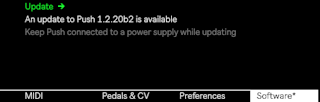
When a new software update is available, an asterisk is added to the Software tab. Press the Update display button to download and install the latest version. Make sure the power supply is connected when updating.
A progress bar is displayed while the update is installing. If needed, you can cancel the process before it completes using the highlighted display button on the right. Once the installation is complete, Push will restart to apply the changes.
Manually updating Push 3 (standalone)
Push 3 (standalone) comes with the latest version of Ableton Live installed. Manually updating or reinstalling Push software may be useful if an automatic update has failed, or to use Push 3 (standalone) with a previous version of Live. For instructions, visit Manually Installing Push 3 (standalone) Software.